

1. Mine does that when it gets knocked off..... so re-detect in utils at the top menu tap.
It will reload and detect the generator.
2. The red text in your gen icon indicates an error. You need to check your USB port and/or cable, then select “rescan devices” from the Utils menu. Sometimes it’s just a matter of unplugging and replugging the cable.
3. In my opinion, every Spooky2 user should have the "Generator Button, Colours and Labels", which is on page 136 in the Spooky2 User's Guide printed out or at least noted for easy reference. By doing this, and by updating my printed copy of the page whenever this User's Guide is updated, I have made using the generators much easier. The latest Spooky2 User's Guide (240 pages) is found in the Spooky2 Downloads page.
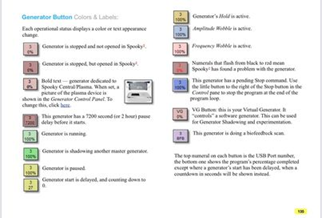
For more details, please check the link:
https://www.facebook.com/groups/spooky2/?post_id=1692043210957575
Comments
Please sign in to leave a comment.