How to add a program to the Morgellons&Lyme graded protocol?

The first thing you do is click on the preset you want to add to in the Preset tab, under >User, then >Morgellon and Lyme Graded.
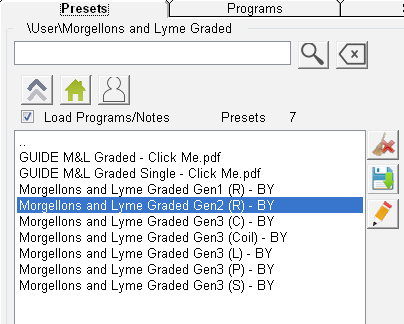
Spooky2_Software-1.png

Then go to the Programs tab, and do the following:
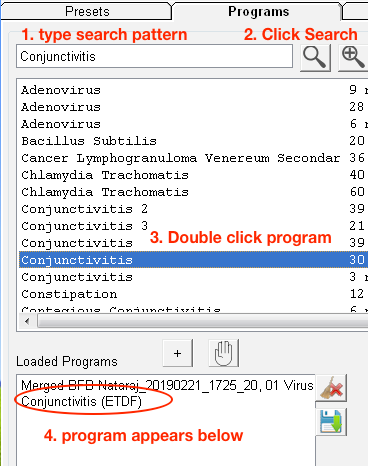
Spooky2_Software-2.png

Now go back to the Presets tab, and click the Save button.
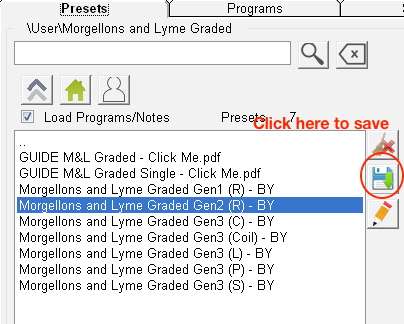
Spooky2_Software-3.png

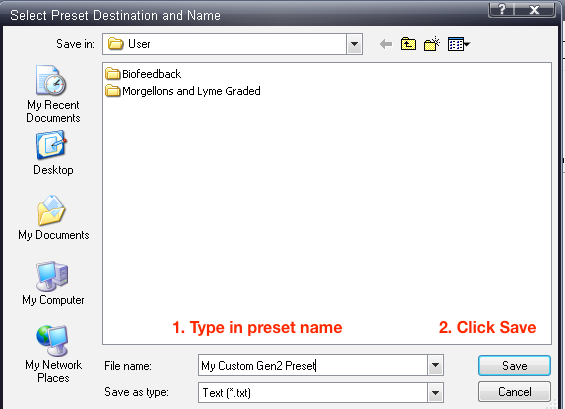
Then do the following:

Spooky2_Software-4.png

For more details, please check the link from:
https://www.spooky2.com/forums/viewtopic.php?f=16&t=10655

Was this article helpful?
0 out of 0 found this helpful

Comments

0 comments

Please sign in to leave a comment.

Articles in this section

See more
Our Blog
Get the latest news and updates first
Our helpline hours:
9 AM – 6PM UTC+8, Monday – Friday
Video Guides
Learn how to use Spooky2 with our short, step-by-step video guides