

Here are the Bedini RPX Settings following from the post by Tony Kerselaers:
The Bedini RPX sideband generator
http://www.spooky2.com/forums/viewtopic.php?p=66539#p66543
Here is how to create the waveforms and settings.

Bedini RPX Settings 0% Offset With Boost
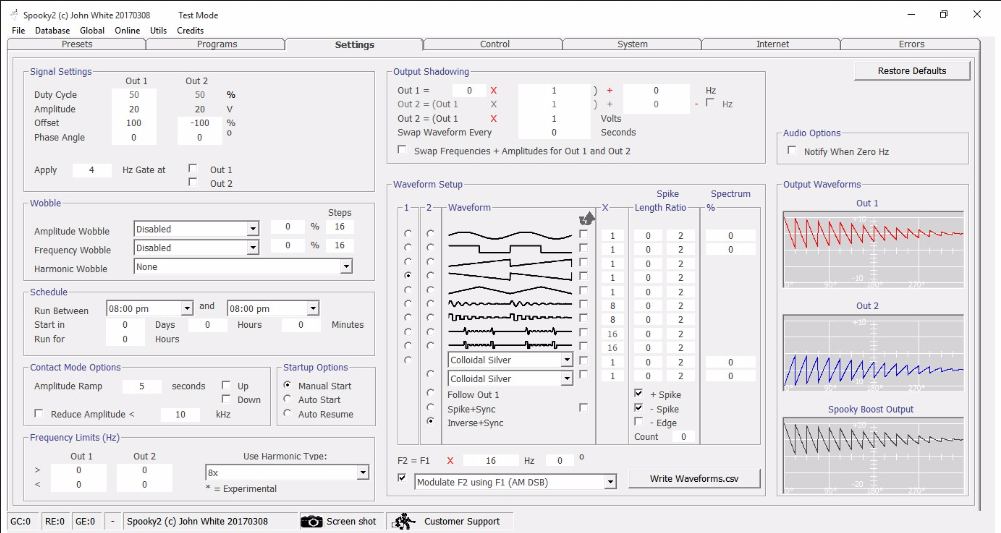
Bedini RPX Settings +100% Offset With Boost
Shell (Empty) Preset For Bedini RPX Settings
Copy the txt files to the Spooky2 program directory i.e.
~/Spooky2/Preset Collections/Shell (Empty) Presets
Bedini RPX Settings, 0% Offset With Boost.txt
Bedini RPX Settings, +100% Offset With Boost.txt
For more details, please check the link:
http://www.spooky2.com/forums/viewtopic.php?f=71&t=7512
Comments
Please sign in to leave a comment.