

1. Check all the connections of your devices. Make sure they are all tightly connected.
2. Rescan your generators under Utils.
3. Restart your computer and generators. Turn on your generators before opening Spooky2 software.
4. Ensure your computer is in the right setting, i.e., no Wi-Fi, firewall is turned off. For more setting requirements, please read the following blog: https://www.spooky2-mall.com/blog/recommended-windows-settings-for-spooky2/
5. Go to Utils, install GenX drivers, and then rescan devices.
6. Try new USB cords.
7. Swap the USB cables between the generators and observe if the problem follows a particular generator or USB cable. Then, swap both generators and cables to verify that the problem is on the generator or the USB port (software issue).
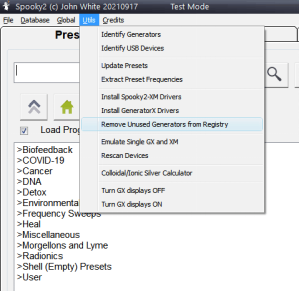
8. If it is a software issue, reinstall drivers on your PC. Go to Utils and select "Remove Unused Generators from Registry".
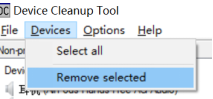
Select your generators, click "Devices", and choose "Remove selected". The device manager will remove all the drivers for your generators.
Restart your PC and Spooky2 generators again. Install the Spooky2 software. The installation will ask to install the drivers for the Spooky2 generators. When Spooky2 software finishes installing, restart the PC and Spooky2 generators once more.
9. GX has been updated. If the software cannot find your GX, you will need to install the latest version of our software.
Comments
Tried it all, nothing works
I have tried everything as well, and nothing is working. I have Windows 10 home. Please help!
Nothing works. Ridiculously bad first hour experience with this thing. Incredible primitive software. Will likely return.
With the generator on and connected to the laptop, I then downloaded the newest version of the Spooky2 Installer (https://www.spooky2.com/downloadspage/), and the Spooky2 software opened with the generator it had not been finding previously. I had tried just about everything mentioned in the article above and was always getting "No generators found" but downloading the 1st April 2026 Full Installer fixed the problem.
Please sign in to leave a comment.