

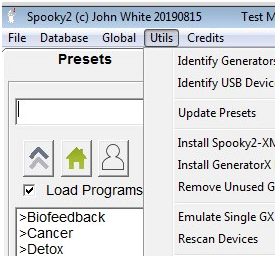
1. Many times I need to unplug the generator USB or cycle power on the generator, then click 'UTILS' and "Rescan Devices" see bottom of this picture: if when you click 'UTILS' and "Rescan Devices" and Spooky2 cannot find everything, wait 5 seconds and then click 'UTILS' and "Rescan Devices" again. The ‘computer OS (operating system) MS Windows’ needs to recognize USB before Spooky2 can.
2. Yes. Check all connections and shut everything down and reboot.
For more details, please check the link:
https://www.facebook.com/groups/spooky2/permalink/1348766858618547/
Comments
Please sign in to leave a comment.